
The short answer
The AR Digital Solutions attendance management system is fingerprint time clock hardware plus attendance software we build for your business. Staff clock on at the clock, on their phone or in a browser. Managers approve timesheets, your award and overtime rules are applied, and approved hours are sent to Xero Payroll automatically. It is fully customisable, and you pay once with no subscription.
What you get
Most time and attendance products are a monthly subscription charged per employee, and the software works the way the vendor decided it should. Ours is built the other way round. We supply the clock, build the attendance software around how your business pays people, connect it to Xero Payroll, and hand it over. You own it. There is no per-employee monthly fee that grows every time you hire.
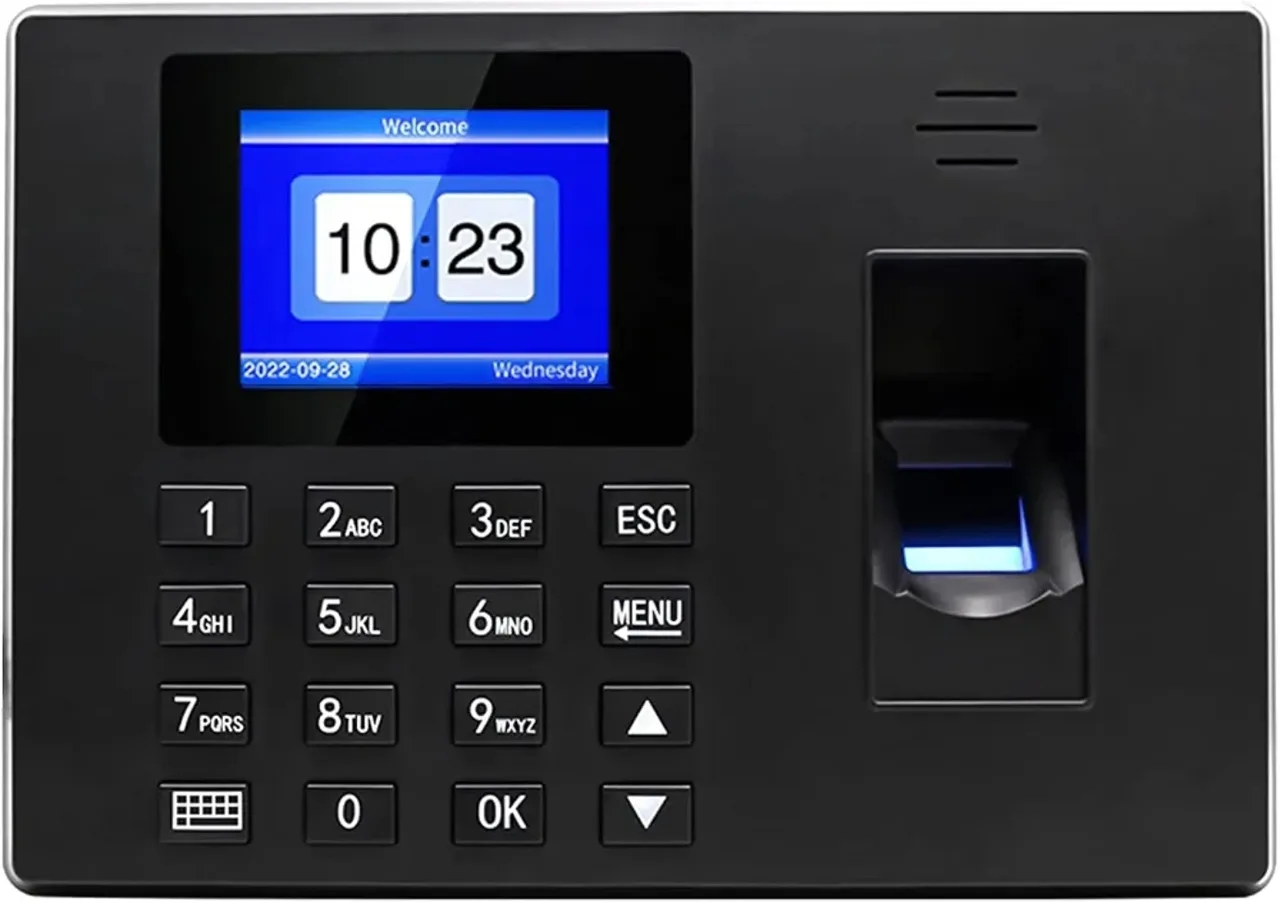
- Time clock hardware. Fingerprint clocks with a colour screen and PIN keypad, mounted at each site. Staff clock on with a finger or a PIN, and the clock keeps working if the internet drops, then syncs when it is back.
- Custom attendance software. A web dashboard for managers and payroll, built to your rules rather than a template.
- Xero Payroll integration. Approved timesheets go straight into Xero as pay run timesheets. No exporting, no re-keying.
- No subscription. A one-off price for the build and the clocks, quoted against your requirements.
Clocking on, wherever your staff work
- Fingerprint and PIN on the wall clock, so nobody clocks on for a mate.
- Mobile clock-on for staff on the road or on job sites, with the GPS location saved against each clock-on and optional geofences around your sites.
- Browser clock-on for office and remote staff.
- Face, card or tablet kiosks where fingerprints don't suit the work, such as food handling, construction or gloved staff. Tell us the site and we will recommend the right clock.
- Multiple sites on one system, with each clock assigned to a location so you can see who is on at each one.
Timesheets and approvals
Clock-ons become timesheets automatically. A live dashboard shows who is on, who is on a break, who is late and who hasn't turned up. Managers review and approve timesheets for their own team or site, with the option of a second approval before anything reaches payroll. Before each pay run the system flags missing clock-offs, unapproved timesheets and unusual hours, so the problems are fixed before Xero ever sees them.
Logins are unlimited and set by role. A site supervisor sees their site, payroll sees everything, and staff see only their own hours.
Pay rules built around your award or agreement
This is where a custom build earns its keep. Off-the-shelf systems give you a list of settings and hope your award fits. We write the rules your business actually uses into the system, so hours are split and costed correctly before they leave it:
- Ordinary hours, paid and unpaid breaks, and daily or weekly overtime at more than one rate
- Weekend, public holiday, night shift and early start penalty rates
- Casual loading and leave loading
- Allowances such as travel, meal, first aid and tool allowances
- Accruals for TOIL, RDOs and ADOs
- Rounding and grace periods for early or late clock-ons, set the way you want them
- Rostered shift patterns, split shifts and shifts that cross midnight
Your award, enterprise agreement or contracts are the brief. We map each rule to a Xero earnings rate, test it against real past timesheets with you, and change it when your agreement changes.
How the Xero Payroll integration works
- Each employee in the attendance system is linked to their employee record in Xero Payroll.
- Each pay rule is mapped to one of your Xero earnings rates, so ordinary time, overtime and penalty hours land on the right line.
- When timesheets are approved, the system sends them to Xero through Xero's official API for the matching pay period.
- Approved leave is sent to Xero too, so balances stay in step.
- Your payroll officer opens the draft pay run in Xero and the hours are already there.
The integration uses Xero's own sign-in, so we never hold your Xero password. If you also want rosters, job costs or leave balances pulled back from Xero, we build that in as well. See our Xero and QuickBooks integration work for the wider picture.
Rosters, leave and job costing
- Rostering. Build rosters, publish them to staff, and compare rostered hours with actual clock-ons.
- Leave. Staff request leave from their phone, managers approve it, and a leave calendar shows who is away.
- Jobs and cost centres. Staff pick a job, project or cost centre when they clock on, so labour cost reports by job or client.
- Staff self-service. Employees check their own hours, rosters and leave without asking the office.
- Notifications. Alerts by email or SMS for missed clock-ons, overtime building up, or timesheets waiting for approval.
Reports
Attendance, lateness, overtime, labour cost by site or job, and hours against roster. Reports can be printed, exported to Excel or emailed automatically on a set day. If you need a report for a client, an auditor or a funding body in a particular layout, we build that layout.
Why no subscription
A per-employee monthly fee looks small at the start. Multiply it by every employee, every month, for every year you use the system, and add the implementation fee and the premium tier you need for award rules, and you pay for the software many times over without ever owning it.
With our system you pay once for the build and the clocks. The software is yours, the data is yours, and it can run on your own server or ours. If you want us to host and maintain it, that is ordinary hosting and support, not a per-head licence. When you grow from 20 staff to 200, the price of the software doesn't move.
Fully customisable to your business
Because we write the software, it can do the things a packaged product can't. Common requests include:
- Drug and alcohol testing at clock-on for mine sites, transport and construction
- Induction or safety-question prompts before a shift starts
- Fatigue rules, such as minimum breaks between shifts and maximum hours per day
- Visitor and contractor sign-in alongside staff attendance
- Links to your CRM, job management, NDIS or rostering software
- Your branding on the dashboard and staff app
The same team builds our NDIS provider software, POS and billing systems and ImmiDesk, so connecting attendance data to the rest of your business is work we do every week.
How we set it up
- Discovery. We go through your award or agreement, sites, pay cycles and how timesheets are approved today.
- Hardware. We recommend and supply the right clocks for each site.
- Build. We build the dashboard, pay rules, staff app and Xero connection.
- Parallel run. For one or two pay runs, the new system runs alongside your current process so you can check every figure before you switch.
- Go live and training. We train managers and payroll, enrol staff fingerprints, and stay on hand for the first pay runs.